
LogGPT 1.3.5: Toolbar Downloads and ZIP-Compatible .lgpt Archives
On this page
OpenAI’s web interface changed again, this time affecting the Dots conversation header. LogGPT 1.3.5 restores the download button and adds another way to export: directly from LogGPT’s Safari toolbar popup. We’ve also given Plus archives a recognizable .lgpt extension in preparation for the upcoming macOS version of Extract Chat. Underneath the new name, they’re still standard ZIP files.
Get LogGPT on the Mac App Store.
Download from the toolbar when the page button is missing
The Dots download button now sits directly in the conversation header’s action strip, with recovery when the page replaces that header. It supports both the previous and updated conversation-menu labels without confusing the conversation controls with sidebar menus or hidden headers.
There is also a fallback that doesn’t depend on the page button being visible. Open LogGPT’s Safari toolbar popup and choose Download current conversation. This works for both Basic and Plus and uses the same export options, purchase status, progress, and cancellation as the in-page download. We’ve adjusted the popup’s width and spacing so the settings and controls fit without shrinking the text.
We added the toolbar option as a fallback in case a future OpenAI interface change hides the page button before we’ve had a chance to update LogGPT. It gives you another way to start the export without waiting for us to catch up with the new page layout.
The toolbar option still needs LogGPT enabled and allowed on the supported conversation page. After updating or re-enabling the extension, reload an already-open conversation so its page script is current. If a download is busy, the page is unsupported, or the script needs a refresh, the popup reports that state rather than leaving you wondering whether anything happened.
If you’re having trouble exporting, please reach out and let us know. The conversation type (ChatGPT, ChatGPT Work, or Dots) and any error message help us investigate; you don’t need to send your private conversation or files. We appreciate the reports, especially when a page change reaches you before it reaches us.
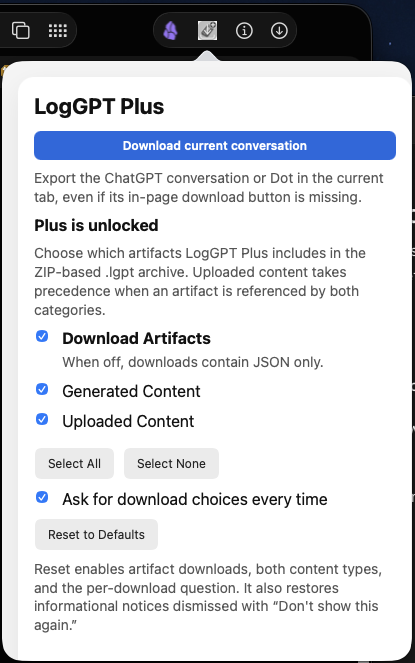
A .lgpt filename, still a ZIP archive
Plus artifact bundles now download with the .lgpt extension. The conversation JSON, artifact files, manifest, and archive layout are unchanged. This is a document-type change, not a new proprietary archive format, and it does not add encryption to the archive.
| Export | File extension | What it contains |
|---|---|---|
| Conversation JSON only | .json |
The structured conversation data, as before |
| Conversation and selected artifacts with Plus | .lgpt |
A standard ZIP container holding the conversation JSON, available selected files, and manifest |
Your existing .zip exports do not need to be renamed or converted. If an older ZIP utility requires a .zip filename before it will open a new archive, rename a copy from .lgpt to .zip; the container itself has not changed. JSON-only downloads continue to use .json.
Preparing for Extract Chat on macOS
The new extension gives the upcoming native Extract Chat app for macOS a document type it can recognize in Finder: LogGPT Plus file for Extract Chat. We’re preparing a more direct path from a downloaded conversation archive to readable Markdown or HTML, with the supporting files referenced locally, rather than requiring users to start with a command-line workflow.
That macOS app is still in development; this is not an announcement that it has shipped. Extract Chat remains the companion project for turning the exported data into something easier to read and reuse. The .lgpt name prepares that workflow without changing the archive you control.
Dots export scope is unchanged: the main timeline and directly attached available files. Linked task histories and nested reply histories are not included.
Included for existing LogGPT owners
The app update is included at no additional charge for existing Basic and Plus owners. Basic keeps your conversation as JSON. Plus is the optional, one-time in-app purchase that keeps available generated and uploaded files alongside the conversation in one archive. If your chats contain research, documents, images, or code, those supporting files are often what makes the record useful when you return to the work later.
Existing Plus purchases continue to cover artifact archiving, including .lgpt bundles; there is nothing to buy again. New users can get LogGPT on the Mac App Store and add Plus from within the app when they want to preserve the files as well as the discussion.
Join the Discussion
Comments for this post live in GitHub Discussions. That keeps moderation in one place and gives the conversation a stable home.