
LogGPT 1.2.1 Makes Large Artifact Exports Easier to Follow and Cancel
On this page
Update — September 14, 2026: LogGPT 1.3.0 is now in Apple’s review process and adds artifact support for ChatGPT Work. If you get LogGPT now, the App Store will provide the 1.3.0 update when it is released. See what is new in LogGPT 1.3.0.
LogGPT 1.2.1 is a usability-focused follow-up to the artifact-preservation features introduced in LogGPT 1.2.0. The update makes large LogGPT Plus exports easier to understand while they are running—and gives you a safe way to stop one when it is taking longer than expected.
Version 1.2.1 was released on the App Store on September 13, 2026. The ChatGPT Work compatibility update described above is now in Apple’s review process.
Get LogGPT from the Mac App Store
Available on the App Store now. Existing owners receive the update at no additional charge, and LogGPT supports Family Sharing.
Your chats, no tracking, no collection, total privacy.
Know What the Conversation Contains
When LogGPT Plus examines a conversation, the export choices now show the total number of artifacts and separate counts for generated and uploaded content. That makes the size of the export visible before collection begins and helps explain why a conversation with many files may take longer to package.
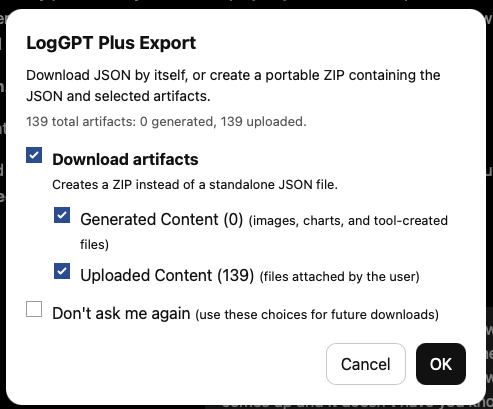
You can still choose generated content, uploaded content, both categories, or a standalone JSON export. Saved preferences can skip this selection dialog, but they no longer hide the progress of the export itself.
Follow Each File as It Is Collected
After the export starts, LogGPT Plus displays the current phase, the number of artifacts collected, the filename being processed, and a progress bar based on the complete artifact count. ZIP creation also reports progress instead of leaving a long-running download without feedback.
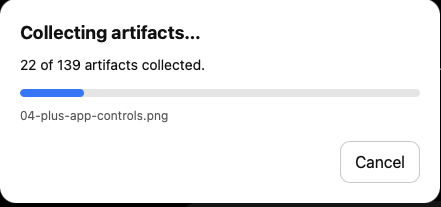
This is especially useful for conversations containing many uploaded documents, generated files, images, or other artifacts. You can see that LogGPT is still working, which file it is handling, and how much of the collection remains.
Cancel Without Leaving a Partial Download
The new Cancel button can stop conversation retrieval, artifact collection, or ZIP creation. LogGPT does not start the browser download until the archive is complete, so cancelling an unfinished export does not leave behind a partial ZIP. Version 1.2.1 also prevents a second export from starting while one is already being prepared.
Partial artifact availability remains a separate case: if an individual artifact cannot be retrieved but the export continues, LogGPT Plus preserves everything it successfully collected and records unavailable or skipped items in artifact-manifest.json.
From Capture to Readable Markdown and HTML
The ZIP produced by LogGPT Plus works directly with Extract Chat. Extract Chat can safely unpack the archive, organize its generated and uploaded artifacts, and create Markdown, HTML, or both with references to the local files in the extracted directory.
That division remains useful: LogGPT captures the authenticated conversation and its associated files in Safari, while Extract Chat processes the resulting archive locally. I am exploring ways to make that handoff easier in the future—possibly through a native application, a droplet-style workflow, or tighter integration—but no particular form has been chosen yet.
You can get LogGPT from the Mac App Store. Existing owners receive subsequent updates from the same listing at no additional charge.
Join the Discussion
Comments for this post live in GitHub Discussions. That keeps moderation in one place and gives the conversation a stable home.